

Picture yourself on the dusty red surface of Mars, watching as the sun sets below a jagged horizon. A moment later, you’re brandishing a glowing lightsaber in time to your favorite song, cleaving through neon-colored blocks that sail at you with impeccable rhythm. Then from your seat at home, you are sitting in a virtual movie theater next to an old friend who is 3,000 miles away, sharing a bag of digital popcorn.
This Virtual Realitiy (VR) is not the future, it’s now. And in 2026, it’s also more accessible, easier, and prettier than ever.
But if you want to jump in there, you’ve probably run into a confusing array of questions. Do I need a gaming PC? What is a “Base Station”? How does the Meta Quest compare to the Apple Vision Pro? Am I going to have to drill holes in my walls?
The good news is that playing VR at home is actually much easier than it seems—if you know the right way to go about it. Gone are the days when you would need a specialized room and $5,000 worth of gear; in their place, svelte headsets that work wirelessly and take minutes to set up.
In this exhaustive guide, we’ll deconstruct exactly what equipment, space and budget you need to transform your living room into the Metaverse. Whether you just want a wire-free experience for fitness, or a high-end simulation rig for flying jets, here’s your road map.
Step 1: Choose Your VR “Path”
Before you spend a penny on cables or clear a square inch of floor space, you must make that choice in how to play. Home VR Home VR can be divided into three categories in 2026. The rest of what you need is determined by your choice here.
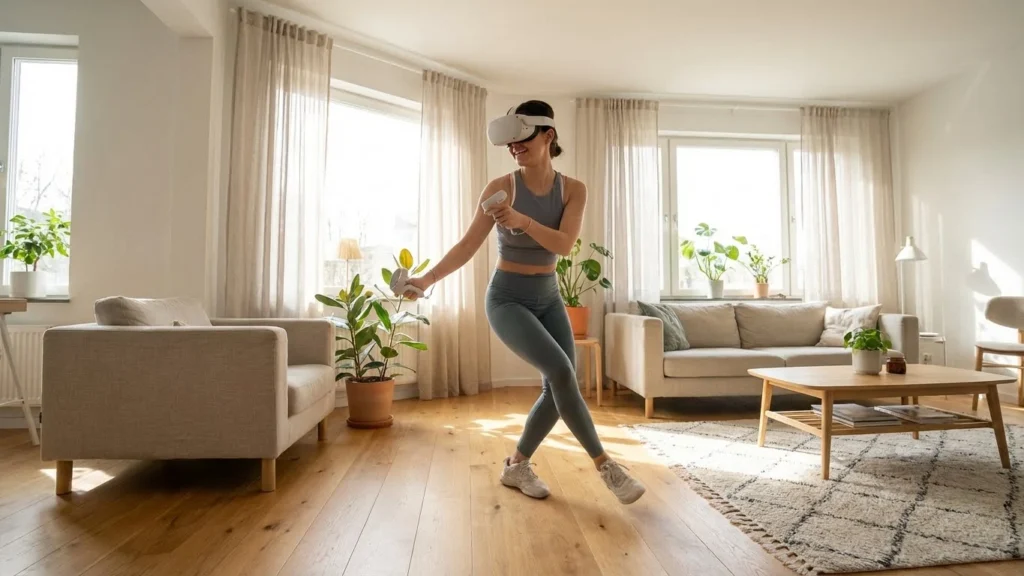
Path A: Standalone VR (The easiest & most widespread)
Best for: Newbies, gym rats, renters and wire haters.
This is the “console in a headset” model. You do not need a P.C. or PlayStation, and you do not need external sensors either. The goggles have the computer, battery and tracking cameras built in. You slip it on, mark a border of safety across the floor with your controller and you’re out.
Best Durables: Meta Quest 3, Meta Quest 3S, Pico 4 Ultra.
What You’ll Need: Only the headset and a smartphone for initial setup.
Path B: Console VR (The “Plug-and-Play” Powerhouse)
Best for: Gamers who already have a PlayStation 5 and are interested in high-fidelity gaming.
If you want to game the next batch of blockbusters (Gran Turismo 7, Resident Evil Village and Horizon Call of the Mountain chief among them) without bothering with the hassle of a PC build, this is your lane. It strikes a balance between ease of use and raw power.
Top Device: PlayStation VR2 (PSVR2).
What You’ll Need: A PlayStation 5 console and the headset.
Path C: PC VR (The Enthusiast’s Option)
Ideal for: Hardcore gamers, flight simmers, racing nuts and modders.
This does all the heavy lifting of rendering hyper-realistic graphics using a powerful gaming computer and then sends it to your headset. This is the only way to play visually demanding simulators like Microsoft Flight Simulator or heavily modded versions of Skyrim VR and Cyberpunk 2077.
Best devices: A valve Index (Old, trusty), a Bigscreen Beyond (Ultralight), Pimax Crystal Light (Great for visual clarity) or a even a Quest 3 that connects to PC through “Link.”
What You Need: A powerful gaming PC, headset and usually a fast Wi-Fi 6E router.
Step 2: The Hardware Requirements
When you have chosen your path, you must guarantee that you are equipped for it. Here are the checklists for each.
By the Standalone VR (Meta Quest / Pico)
This is the smallest gate. The odds are, you have everything you need already.
The Headset: This is the headset, two motion controllers, and a charging cable.
A Smartphone: You must have the Meta Horizon (for Quest) or Pico app on iOS/Android in order to create an account and pair your headset.
Wi-Fi: 5ghz Wi-Fi connection is used for better experience. You don’t need the internet to play every game, but you need it to download them.
Tip: If you intend to stream games from the cloud or your PC down the line, opt for a Wi-Fi 6 or 6E router for less frustrating gaming.
For Console VR (PSVR2)
Console: PlayStation 5 (Disc or Digital edition). The original PS4 isn’t PSVR2 compatible.
Controllers: The PSVR2 has its own controllers, called “Sense” controllers, which will track your finger movements. Just be sure to keep a normal DualSense controller handy for system-side navigation and traditional games of, say, “Cinema Mode.”
Space: You’ll need to be near enough the console that its 4.5-metre cable is able to reach you with room to move.
For PC VR (The Specs Check)
This is where it gets tricky. If you want to wreck face on Half-Life: Alyx at max settings, that office laptop just isn’t going to cut it. VR needs your PC to pump out two high-resolution images (one for each eye) at 90 frames per second or better. If your PC stutters, it’s not just a stuttery game — it’s motion sickness.
| Component | Minimum (Playable) | Recommended (Smooth) | Enthusiast (Ultra) |
|
GPU (Graphics)
|
NVIDIA RTX 3060 / AMD RX 6600 | NVIDIA RTX 4070 / AMD RX 7800 XT | NVIDIA RTX 4090 / RTX 5080 |
|
CPU (Processor)
|
Intel Core i5-12400 / Ryzen 5 5600 | Intel Core i5-14600K / Ryzen 7 7800X3D | Intel Core i9 / Ryzen 9 |
|
RAM
|
16GB DDR4 | 32GB DDR5 | 64GB DDR5 |
|
OS
|
Windows 10/11 | Windows 11 | Windows 11 |
|
Connectivity
|
USB 3.0 Port | USB-C 3.2 Gen 2 / Wi-Fi 6E | Dedicated Wi-Fi 7 Router |
- Note on Laptops: If using a gaming laptop, ensure it has a “MUX Switch” or a direct connection from the dedicated GPU to the video output port. Laptop GPUs are generally 20-30% weaker than their desktop counterparts with the same name.
3: The “Immersion Multipliers” (Advanced Hardware)
This is the one part of footage most guides don’t cover. To take matters from “playing a game” to “living inside one”, consider these modifiers.
Haptic Vests (Feeling the Impact)
A controller shakes when you fire a gun, but what if you’re shot?
The Device: bHaptics TactSuit X40.
What it is: A vest with 40 vibrating motors. If an opponent comes up from behind you in games like Pavlov VR or Population: One, it will buzz your back. The left side of your rib cage rumbles when an explosion goes off to your left. It’s an extra level of adrenaline, hard to explain until you’ve experienced it.
Full Body Tracking (FBT)
Regular VR follows your head and hands. But a glance down — where are your legs? They are invisible in most games.
The Device: HTC Vive Trackers (3.0 or Ultimate) or SlimeVR.
What it is: You strap these small pucks around your ankles and waist. Suddently you can dance, kick and lay straight down in social apps like VRChat. This is crucial for dancers or social VR fans.
IR Ligtht (Along with Expansion of the Dark)
Most VR headsets (Quest/Pico) require light to be able to see the room. If you’re playing at night, odds are good that you need to leave the lights on in the room, leading to “light leak” into the headset.
The Device: Infrared (IR) Illuminator.
How it works: It floods the room with invisible infrared light. Between the headset cameras, the room gleams with high-noon daylight. The room is completely dark to your eyes. So you can enjoy total immersion with as little light leak as possible.
Step 4: Your Real-World Space (The “Play Area”)
You don’t need a gymnasium, but you do need to be safe. VR systems employ “Guardian” (Meta) or “Boundary” (Sony) system to allow you to draw a digital fence around your safety zone. Any time you get near an edge, a grid jumps into your vision so that you don’t go punching your TV.
Screenshots: 16 New Apps for a New YearThe software can only do so much, however, and it doesn’t save you if you are swinging your arms willy-nilly in a room smaller than the game believes it to be.
The 3 Types of Play Spaces:
Seated Mode
Space: At least 4 feet (1.2m) in all directions.
Ideal For: Flight simulators, racing games, fishing games or movies (Netflix/YouTube VR).
What Is Needed: Enough space to spin your office chair in a complete circle without it bumping against your knees or hitting the desk behind you, but not so much that you touch the wall when you reach out with your arms.
Standing Mode
Space: At least a 5×5 feet (1.5m x 1.5m).
Who It’s For: Rhythm games (Beat Saber, Synth Riders), boxing games or shooters where you don’t physically move around from cover to cover.
You: You don’t move from the same spot in space (the “center”), but you’ll want to be able to take a half a step in any direction and spread your arms all the way out without hitting furniture.
Room-Scale Mode
Minimum Space: 6.5×6. 5 feet (2m x 2m) or larger.
Ideal For: Adventure, puzzle and RPG games (Superhot, Job Simulator).
Prerequisite: It enables you to walk around in the virtual world. If you take three steps to the left in your living room, you are taking three steps to the left in whatever game.
⚠️ Critical Safety Tips
Get the Floor Clear: You’re going to get VR actively blinding you to your actual surroundings. A toy belonging to a stray dog, an edge of a rug that curls up super conveniently or maybe even the family cat taking a nap can make for some serious trippables.
Ceiling Fans: The #1 nemesis of VR gamers. If you have a ceiling fan with a low clearance, turn that off before you start. It may be a rite of passage you don’t want to have: Reaching up to nab a virtual frisbee and smacking the hell out of your hand on that spinning fan blade over there.
The ‘Mat’ Trick: Purchase a small, round yoga mat or an “anti-fatigue” kitchen mat. Put it right in the middle of your play area. It provides your feet with a tactile reminder of where the middle of the room is, so you don’t inch toward the TV.
Step 5: The “Hidden” Must Haves (Don’t Overlook These)
Most of us buy the headset and think the job is over. And then, two days later, they’re on Amazon ordering these essential accessories because the stock experience just didn’t feel right. Budget an additional $50 to $100 for the quality-of-life upgrades.
Hygiene & Comfort
Silicone Face Cover: The foam padding that typically comes on headsets will absorb sweat like a sponge. It gets gross, fast. Slap a silicone cover (which often comes with Quest 3S) or aftermarket “PU leather” replacement from VR Cover or Kiwi Design on the sucker. It’s also something that’s wipeable, hygienic, and cooler for your skin.
Lens Cloth/ Microfiber cloth: Do not clean VR lenses with your t-shirt, or paper towel. The type is soft plastic and they scratch very easily. Light scratches disrupt the immersion by producing “god rays” (rays of light). (Nope, just use a microfiber lens cloth for your camera dedicated to that purpose.
Power Management
Battery Strap Sturdy stand-alone headsets are powerful, but they’re also power hogs and tend to die after an hour and a half or two.
The Fix: If you plan to spend hours in there, buy a “Battery Elite Strap” (a battery-in-back head strap doubling as a comfort counterweight) or else stuff your pocket with power bank and run USB-C cable up to headset.
Connectivity (For PC VR Users)
The “Link” Cable: If you’re hooking a Quest up to a PC with a wire, it doesn’t use the same charging cable that comes in the box. It is only USB 2.0. You will need a high-speed USB-C 3.0 Fiber-Optic cable (original Meta cable or third-party like Anker / Syntech) that can do 5 Gbps data transfer.
Ethernet Cable: Your PC will need to be connected to your router directly via Ethernet in order for wireless PC VR (AirLink/Virtual Desktop) is used. If both your PC and your headset are on Wi-Fi, the double latency is enough to render the game unplayable.
Step 6: Can I Use VR With My Glasses?
Yes, but be careful.
Most recent headsets (including the Quest 3 and PSVR2) include adjustable depth buttons or “spacers” for people who need to make room for their spectacles. But if you let your glasses to touch to VR lenses, both of them will get scratches forever.
The Solution: Prescription Lens Inserts
This is probably the best way to make your bike more comfortable. Companies like Zenni Optical, VR Optician, HonsVR or Reloptix produce prescription lenses that snap right on top of the internal lenses within a VR headset itself.
Cost: Usually $50-$80.
Pros: Say goodbye to fogged up glasses, no more forcing it on your temples and vision so sharp.
Step 7: Dealing with the “VR Sickness”
One common concern for novices is feelings of nausea. In 2026, higher refresh rates (the GIF above runs at about 30Hz, for reference) have fixed this for many people, but there are still some who cannot escape it if your brain gets confused by the movement.
How to get your “VR Legs”:
Begin Stationary: Play games where your character is stationary (such as Beat Saber or Moss).
Teleport Movement: For adventure game play, select “Teleport” (you point and click to move) over “Smooth Locomotion (walking with a joystick). Hiking normal = #1 newbie sickness.
The Fan Trick: Aim a fan at the play area. 4.) It lessens nausea and provides a subconscious orientation (you always sense where the fan is).
Stop at Once: If you experience dizziness, nausea or heat, put down the headset. Do not try to “push through.” All you’re doing is training your brain to relate VR and vomit.
Summary Do You Really Need All These Things?
If you’re in a hurry, here is your shopping list according to your personal profile (and booking rate):
The “Just the Essentials” Kit (Budget: ~$300 – $500)
Headset: Meta Quest 3S (128GB).
Space: 5×5 feet of free floor.
Attachment: Silicone Face Cover (used to be with sweat).
The “Pro Console” Kit (Budget: ~$550 + Console)
Headset: PlayStation VR2.
Console: PlayStation 5.
Space: 6×6 feet (Room Scale).
Accessory: Official Charging Dock So controllers are always charged.
PC Enthusiast Kit (Around a 1,000 Dollar Budget + PC)
Headset: Meta Quest 3 (512GB) or Valve Index.
PC: RTX 4070 / Ryzen 7.
Router: Wi-Fi 6E dedicated router.
accessory: battery elite strap + prescription lens inserts.
Frequently Asked Questions (FAQ)
Q: Can I play VR without a TV or a monitor?
A: No! Once the headset is on, it’s right in front of your face. But it’s useful to have a TV or phone in your vicinity for “Casting” — beaming the video feed from your headset onto the television, so friends and family can see what you’re doing.
Q: Can I watch movies in VR?
A: Absolutely. With apps like Netflix, YouTube VR, Prime Video and Bigscreen Beta you can watch videos on a virtual cinema screen that appears to be 100 feet wide. It also does wonders for 3D movies.
Q: Is VR safe for kids?
A:Many manufacturers (Meta,Sony) have recommended VR for ages 10-13+.
Physical reason: The IPD (Inter-Pupillary Distance) of a child is generally too small so that the difference between eye and lens distance cannot be balanced out.
Structural Reason: Young children may face difficulties in differentiating between virtual actions and real life effects. Always supervise children.
Q: Will I have to drill holes for the “Base Stations”?
A: Only with certain PC VR headsets (such as the Valve Index or Bigscreen Beyond).
Meta Quest / Pico / PSVR2: Embrace “Inside-Out Tracking.” The cameras sit on the headset itself. No wall sensors needed.
Valve Index / HTC Vive: Select “Outside-In Tracking.” You’ll also have to attach two laser boxes (Base Stations) to the corners of your room for millimeter-perfect accuracy.
Conclusion:
So that s it The barrier is not as high as you think
So, what’s the necessary hardware to play VR? Strangely little, in 2026.
And if you have a 6×6-foot clear space and a few hundred dollars, you can grab a standalone headset and be in the virtual world in less than 15 minutes. No towers stood, no sensors encrusted the walls, no wires snaked about. The technology has finally matched the dream.
Now it’s just you that we’re missing.
Ready to jump in?
If you are designing your first VR room, I’d love to hear about it. Leave a comment and let us know about headsets you’re considering, or post your own tips for new players!




**boostaro reviews**
Boostaro is a purpose-built wellness formula created for men who want to strengthen vitality, confidence, and everyday performance.
Boostaro is a targeted wellness formula designed to help men support vitality, confidence, and daily performance.
**neurosharp official**
Neuro Sharp is an advanced cognitive support formula designed to help you stay mentally sharp, focused, and confident throughout your day.
Neuro Sharp is an advanced cognitive support formula designed to promote mental clarity, focus, and confidence throughout the day.
**back biome official**
Mitolyn is a carefully developed, plant-based formula created to help support metabolic efficiency and encourage healthy, lasting weight management.
Mitolyn is a carefully developed, plant-based formula designed to support metabolic efficiency and promote healthy, sustainable weight management.
A really good blog and me back again.
Thank you! We’re really glad you enjoyed the blog and look forward to having you back again.
PurDentix is a revolutionary oral health supplement designed to support strong teeth and healthy gums. It tackles a wide range of dental concerns
PurDentix is a revolutionary oral health supplement designed to support strong teeth and healthy gums while addressing a wide range of dental concerns.
InsuLeaf is a high-quality, naturally formulated supplement created to help maintain balanced blood glucose, support metabolic health, and boost overall vitality.
InsuLeaf is a high-quality, naturally formulated supplement designed to help support healthy blood glucose balance, metabolic health, and overall vitality.
Manergy is an advanced male vitality supplement created to help support healthy testosterone levels
Manergy is an advanced male vitality supplement designed to help support healthy testosterone levels and overall male energy and performance.
NerveGenics is a naturally formulated nerve-health supplement created to promote nerve comfort, cellular energy support, antioxidant defense
NerveGenics is a naturally formulated nerve health supplement designed to support nerve comfort, cellular energy production, and antioxidant protection.
ProstAfense is a premium, doctor-crafted supplement formulated to maintain optimal prostate function, enhance urinary performance, and support overall male wellness.
Thanks for sharing! ProstAfense is a premium, doctor-formulated supplement designed to support healthy prostate function, improve urinary performance, and promote overall male wellness.
NerveCalm is a high-quality nutritional supplement crafted to promote nerve wellness, ease chronic discomfort, and boost everyday vitality.
NerveCalm is a high-quality nutritional supplement designed to support nerve health, help ease chronic discomfort, and promote everyday vitality.
Kerassentials is an entirely natural blend crafted with 4 potent core oils and enriched by 9 complementary oils and vital minerals.
Kerassentials is a fully natural blend formulated with four core oils, supported by nine complementary oils and essential minerals.
wish you all the best
Thank you so much! Wishing you all the best as well—we truly appreciate your support!
Mass comment blasting: $10 for 100k comments. All from unique blog domains, zero duplicates. I will provide a full report and guarantee Ahrefs picks them up. Email mailto:helloboy1979@gmail.com for payment info.If you received this, you know Ive got the skills.
We do not accept or engage in spam, mass commenting, or manipulative SEO practices. Please refrain from sending such messages.
wish you best and best
Thank you so much! Wishing you the very best as well—we truly appreciate your support!