
In our digital age, the smartphone is not just what we use to connect with people; it’s become our external brain. It stores our memories, handles our money, guides our travel and joins us to the global brain. But for all the processing power of these latest Snapdragon or A-series chips, and for all the brilliance of 4K OLED displays, there’s one simple, oft ignored limiting factor: the battery.
Perhaps the most important yet least understood pieces in modern technology are dying a slow death: smartphone batteries. 1 They are the chemical hearts beating inside our glass and metal slabs. When they break, our ability to connect with the world is broken. “Low battery anxiety” (nomophobia) is a thing in 2025, and it leads us to lug around power banks, search for outlets at coffee shops.
But what’s going on inside this black rectangle? How do you turn chemical energy into an Instagram feed? In a few years, batteries can die permanently. Oh, and does putting your phone in the freezer actually work?
In this comprehensive guide, we navigate the entire smartphone power landscape. We will take a deep dive into the chemistry of Lithium-ion cells, the recent history of portable power, dispel old charging myths and introduce you to the future of dense solid-state energy.
Welcome to the TechSerps deep dive on smartphone batteries.
The Evolution of Portable Power
In order to comprehend where we are, let’s see how we got here. The history of the smartphone battery is a history of chemistry warring against physics.
The Dark Ages: Nickel-Cadmium (NiCd)
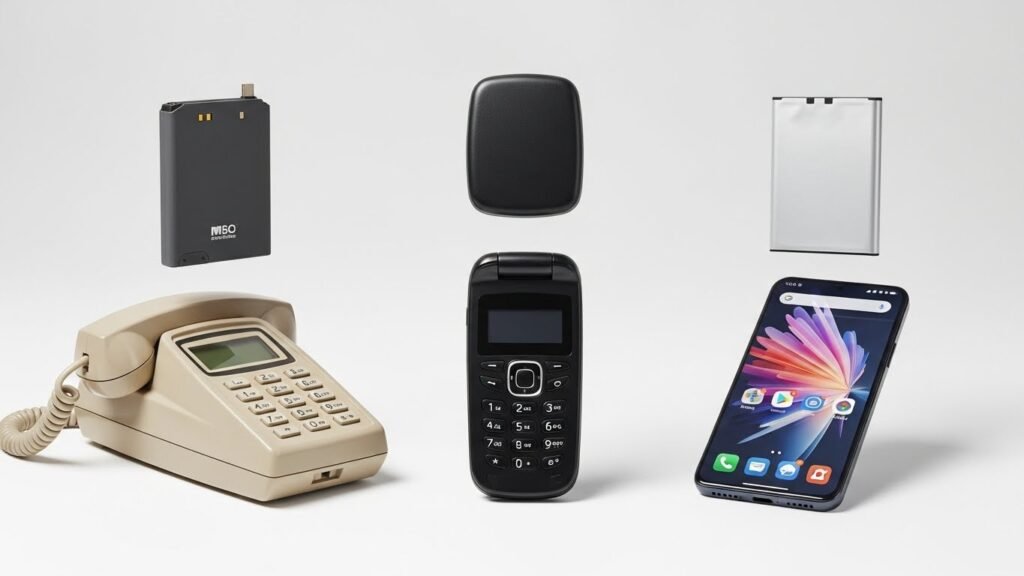
The “brick phones” (such as the Motorola DynaTAC) of the 1980s and early 90s used Nickel-Cadmium (NiCd) batteries. They were heavy (Cadmium is a heavy metal), not so friendly to the environment and suffered from Memory Effect, which was a famous disadvantage.
If you didn’t completely discharge a NiCd battery before recharging, the battery would “remember” your shorter cycle and shrink its capacity accordingly. That forced users into the inflexible cycle of draining their phones completely dead before charging them up — a habit some still, mistakenly, apply to modern phones today.
The Middle of the Road: NiMH
Then as cell phones got smaller, we switched to Nickel-Metal Hydride (NiMH). These were thinner and had a higher energy density than NiCd. They were less poisonous, with less of a memory effect, but still not efficient enough for the looming smartphone revolution. They took an eternity to charge and drained quickly while the phone was at rest (they had a high self-discharge rate).
The Revolution: The Age of the Lithium-Ion (1991–)
The game changer was in 1991 when Sony introduced the Lithium-ion (Li-ion) battery on the commercial market. 2 That was a quantum leap of technology.
No Memory Effect: Free of memory effect, users could charge their p-p before it run out.
High Voltage: A single Li-ion cell provided approximately 3.7 volts instead of 1.2v per NiCd/NiMH cell.
Energy Density: They crammed a lot more energy into a lighter, smaller package.
The modern smartphone, from the original iPhone and Android devices onward, would not be a physical thing without the creation of the Li-ion battery. They’d prove too weighty to hold, and too thick to be pocket-friendly.
Battery Science – What’s Inside a Battery – This is the REAL screener!
When you plug in your phone, you are not filling a hollow tank with “electricity.” You re creating a chemical reaction in reverse. With some background on the science of it, let’s get into Lithium-ion (Li-ion) and Lithium-Polymer (LiPo) batteries.
The Four Pillars of a Cell
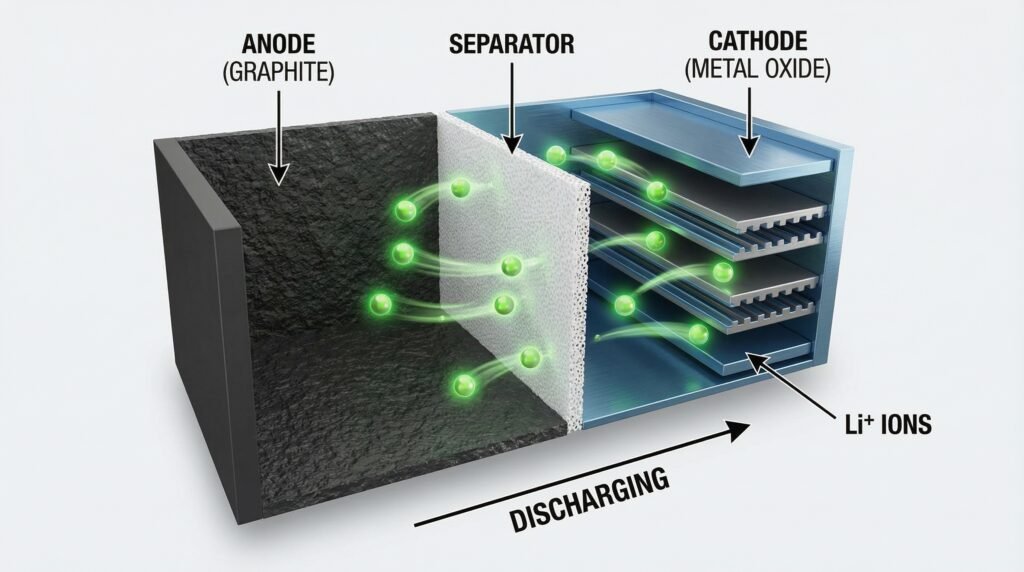
Each battery of the smartphone is traditionally made up of four main parts were in a “Swiss roll” (jelly roll) configuration:
The Anode (The Negative Electrode): Typically comprised of graphite (carbon). Over here under a charged battery, Lithium ions are stored between these sheets of graphene like guests in a hotel.
The Cathode (The Positive Electrode): Normally it’s composed of a lithium metal oxide (e.g. Lithium Cobalt Oxide). This is the direction where the ions like to go.
The Electrolyte: The chemical solution (liquid or gel) that resides between the electrodes. It serves as the highway through which Lithium ions can swim to and fro.
How It Happens: The ‘Rocking Chair’ Move
Picture a Lithium-ion battery as being like a rocking chair or a shuttle.
Discharging (Or Using the Phone): When you read an email those Lithium ions find their way back home, and reattach to the cathode when they leave. By virtue of this movement of ions, a flow of electrons is established in the external circuit and that’s where you get your chip (whatever it does) and screen power.
Charging: All you do is plug in a USB-C cable and electricity from the wall pushes the ions off of their, er, bench (Cathode) onto another section of circuitry that makes them swim against the current back to Anode which is where they hang out until needed again.
LiPo vs Li-Ion: What’s the Difference?
Frequently you will notice Li-ion or ‘LiPo’ listed in the specs.
Lithium-Ion (Li-ion): Has a liquid electrolyte. These usually include an inflexible metal case (round or rectangular). They have the highest energy density and lower cost to produce.
Lithium-Polymer (LiPo): Electrolyte in a polymer gel. This enables the battery to be encased in a pliable foil pouch.
The Plus: Phone makers love LiPo because they can be molded to fit into ultra-thin or curved phones.
The Bad: Their cost is a little higher and their life is a little shorter than the rigid Li-ion cells.
Decoding Battery Specs (mAh, Wh and C-Rates)
To be shrewd tech consumers, you have to speak the language of power.
Milliampere-hour (mAh)
This is the “gas tank size.” A battery of 5000mAh (more the value of mAh, more the power) is bound take make its charge last when compared to a phone with 3000mAh. However, bigger isn’t always better. A phone can have a 5000mAh battery and still not last as long as one with a 4000mAh if the first has an inefficient processor, and a brighter, higher-resolution screen. Optimization is just as important as raw capacity.
Watt-hours (Wh)
This is the real currency of energy. That is to say it is determined by the product of capacity (Ah) and voltage (V). They are helpful when comparing the capacity of batteries in different devices (say your phone and your laptop) as they normalize for voltage differences. 6
Charge Cycles
A “cycle” isn’t simply plugging in your phone once. A charge cycle is the equivalent of using 100% of your battery’s capacity, whether all at once or spread out over a few days.
Example: Let’s say you drain half your battery today and recharge back to full. You use 50% tomorrow and charge it right back up to full. And that’s one charge cycle, not two.
Lifespan: A typical rechargeable lithium-ion battery is designed to safely tolerate at least 500 charge cycles with minimal capacity loss thereafter (an increase over earlier, less stable or less energy-dense batteries).
Making Sense of Modern Charging Tech
The days of the standard 5-watt brick are over. We’re living in the age of hyper-speed.
USB Power Delivery (USB-PD)
This is the standard that Google, Apple, and Samsung follow. It enables the charger and smartphone to “talk” to one another. The phone reports to the charger how much voltage and amperage it can take. USB-PD can be as small as the earbud charger or expand to 240W for gaming laptops.
Patented Case for Fast Charging (VOOC, Warp, HyperCharge)
Companies like Xiaomi, OPPO and OnePlus use their own proprietary tech. 8 Instead of upping the voltage (which produces heat inside the phone), they kick huge amounts of current (Amps) around through custom cables and dual-cell battery designs. This enables heinous charging speeds — 0% to 100% in fewer than 15 minutes — but usually requires comparably heinous, special chargers included in the box.
Wireless Charging (Qi and MagSafe)
Wireless charging uses magnetic induction. 9 Coils in the charging pad develop a magnetic field, which generates an electric current inside a coil located down inside the back of your phone. 10
Pros: Convenience.
Cons: Inefficiency. Wireless charging produces a lot of waste heat, and the battery can degrade faster through only hot charging than wired.
The Quiet Killer – How Batteries Die
Why does your phone battery last a day and a half when it’s brand new, but won’t even make it past lunch two years in? `This phenomenon is known as Chemical Degradation.
Lurking inside the battery is a layer called the Solid Electrolyte Interphase (SEI), which forms on the anode every time you charge. 12 It’s a bit like when rust or plaque accumulates in arteries. With thickening of the SEI layer, it absorbs the free Lithium ions. 13 Eventually, there are so few ions remaining that we can’t shuttle energy around effectively! The “tank” shrinks physically.
Factors accelerating degradation:
Heat: Chances are, you’ll expect this one. Heat above 30°C (86°F) speeds up the chemical reactions that destroy cells.
High Voltage Stress: A battery stored at a state of charge of 100% is at high internal pressure.
Deep Discharge: The electrolyte can decompose and the electrode material may break when discharged to 0%.
10 Power User Features to Boost Your Battery Life
If all you do is reach for your phone, unlock a story or two and close again, then your battery will last 3+ years. Here’s the TechSerps Master Guide to maximizing your battery life.
The 20-80% Golden Rule
Lithium-ion chemistry prefers that batteries not be drained all the way to 0%, but does not need to be fully charged either. This is because of a phenomenon called the ”sweet spot,” which is somewhere between 20% and 80%.
Don’t let it sit plugged in at 100% all the time every night (unless you utilize optimized charging features).
Don’t let it drop to 0%. The two most unnatural states for a battery are 0% and 100%.
Action: Repeated partial charges throughout the day are better than one marathon charging session.
Temperature Management
Heat is the number one enemy.
Gaming: If you’re gaming, for games like Genshin Impact or PUBG Mobile that can cause your phone to run hot, take the case off and let the heat escape.
Cars Dashboards: Never leave your phone on a car dash in the sun. The internal temperature can spike to potentially dangerous levels, putting capacity into a state of permanent damage in a matter of minutes.
Screen Optimization
More power is consumed by the display.
Brightness: Auto-brightness is fine, you should just keep it manually low.
Refresh Rate: 120Hz feels great, but switching to 60Hz will extend your battery an additional 15-20% on long days.Related Articles:
Dark Mode: If your phone has an OLED (AMOLED) display, enable Dark Mode. On OLED displays, black pixels are really off – consuming no power whatsoever. 15 Dark mode can use much less power than white themes.
4. Manage Connectivity
5G is a power hog. If you are in an area with spotty 5G coverage, your phone works overtime trying to find a signal.
-
Tip: Switch to 4G/LTE in settings if you don’t need gigabit speeds. It is much more power-efficient.
-
Tip: Turn off “Wi-Fi Scanning” and “Bluetooth Scanning” in your location settings.
5. Audit Background Apps
Facebook, Instagram, and TikTok love to refresh in the background.
-
iOS: Go to Settings > General > Background App Refresh and turn it off for non-essential apps.
-
Android: Use the “Adaptive Battery” feature or manually restrict battery usage for social media apps in Settings.
6. Haptics and Vibration
It takes a lot of energy to spin the vibration motor inside your phone. Turning off keyboard haptics (vibration on tap) creates a small but cumulative saving over thousands of text messages.
7. Use “Optimized Charging” Features
Modern iOS and Android versions have “Smart Charging.” They learn your sleep routine and hold the battery at 80% through the night, only finishing the final 20% right before you wake up. Enable this immediately.
8. The “Airplane Mode” Hack
If you are in a location with zero signal (like a subway or remote hike), your phone will drain its battery rapidly boosting its antenna power to search for a tower. Put it in Airplane Mode until you return to civilization.
9. Update, But Be Patient
Software updates often include battery optimizations. However, immediately after a major update, your phone might index files in the background, causing drain for 24-48 hours. This is normal.
10. Use Original Chargers
Cheap, gas-station charging cables often lack proper voltage regulation chips. They can deliver unstable power currents that stress the battery management system (BMS) of your phone. Stick to certified (MFi or OEM) cables.
What’s next. The future.
We’re getting to the end of how efficient Lithium-ion batteries can become. To get weeklong phones, we need new physics.
Solid-State Batteries (The Holy Grail)
This is the most hyped technology. Today’s batteries are based on liquid electrolytes (which are flammable). 16 This can be substituted by a solid ceramic or glass material to construct solid-state batteries.
Pros: They’re not flammable, can function at freezing temps, and store 2-3x more energy than the batteries we currently have in the same size.
Timeline: Anticipated in high-end consumer electronics by 2027-2028.
Graphene Technology
Graphene is a “wonder material” — a single sheet of carbon atoms arranged in a honeycomb pattern. 17 It is incredibly conductive.
Advantages: Batteries made from graphene could charge from 0-100 percent in seconds and last through thousands more cycles than a Li-ion battery.
Timeline: Still expensive and in a prototype phase at phone shop, but trickle-down to phones is coming soon.
Lithium-Sulfur (Li-S)
Lithium-Sulfur batteries have ultrahigh energy/power density, and use sulfur, which is one of the most abundant nutrient material. 18 The problem has always been that they degrade quite quickly, however new discoveries are rectifying this stability issue.
Over-the-Air Wireless Charging (True Wireless)
You walk into a room and your phone starts charging while it’s in your pocket, the way it connects to Wi-Fi. Companies from Xiaomi to Motorola are exploring “Air Charging,” using beamforming waves.
DIY Battery Doctor - Troubleshooting GuideJournal
But before you shell out for a battery replacement, try these tips.
Issue: “My battery percentage is never stable (e.g., it shows a decrease from 40% to 10%).”
Diagnosis: Your battery is uncalibrated. The software doesn’t understand where the actual “zero” and “full” positions are.
Solution: Perform a manual calibration.
- You have to use the phone til like when it turns off.
- Yesterday I was making a cup of tea and my PC just died, Hit the switch in the back off then on to make sure it was dead.
- Then plug it in (while off) and charge all the way up to 100%.
- Remove, charge and check it’s 100%.
- Restart the phone.
Problem: ‘My phone heats up when I charge it.’
Diagnosis: This is standard for quick charging, though if it’s too hot there may be a problem.
Solution: Remove the case. If it continues, use a slower (5W or 10W) charger. If it’s still getting too hot, it’s possible that either the internal power management chip or a battery cell is damaged.
Problem: “Slow charging.”
Diagnosis: Usually a dirty port.
Solution: Wooden toothpick (Do NOT use metal!) to gently excavate any pocket lint from the USB-C/Lightning port. You will be shocked by how much dust comes out.
Impacts on the Environment, and Recycling
And we cannot talk about batteries without talking about the planet. Things like Cobalt, Lithium and Nickel in lithium-ion batteries are—weapons-grade materials that must be massively mined in ways that usually come with a lot of environmental costs as well as human rights abuses. 19
Why you must recycle:
Wasting a smartphone in the garbage is disaster. When the battery gets punctured in a garbage truck, fires start. 20 And the rare earth metals within it are nonrenewable.
The TechSerps Advice: When it’s just not holding a charge anymore, bring it to an authorized e-waste facility or a retailer like Best Buy or Apple (both of which have free recycling programs). Future recycling techniques (hydrometallurgy) hope to recover 95% of battery materials in order to create new ones.
Conclusion: Empowering Your Digital Life
Smartphone batteries are feats of modern engineering — a (slightly volatile) chemical reaction kept in check and harnessed to its full potential all while fitting into the palm of your hand. They won’t last forever, but how you take care of them may determine whether they make it two years or four.
By recognizing the chemistry (keep it cool and avoid deep discharges), using the software (optimised charging and dark mode) and understanding the limitations, you can put aside your anxiety at the 1% red icon.
The future looks bright for battery tech — thanks to innovations like solid-state and graphene that can give us multi-day battery life. But in the meantime, a little bit of knowledge can be empowering.
Stay Power-Hungry!
For more in-depth hardware reviews that discusses everything from new smartphones to updated back-end software, bookmark TechSerps. We bring a human touch to technology. Did you find this guide useful? Send the link to a friend who’s always asking for your charger!
FAQs:
Does fast charging hurt my battery?
Not always — fast charging takes two approaches. 21 … -1 -0 Windup Into rangeGuard 95 Force-Opponent-2 You regain your footing and puff yourself up for a split-second wind-up that deals massive damage while simultaneously bursting you with power. Phase 1 is an explosion of power up to 50-70%. Phase 2 becomes much slower as to avoid raising of temperature. As long as you can keep the phone cool, you’ll suffer little ill effects from fast charging compared to how handy it is.
Does killing apps save battery?
Myth! On newer iOS and Android, multitasking with background app termination uses more battery. Apps are frozen in RAM beyond what the OS knows to load. When you kill off, they phone has to work harder (use more CPU) to reload it from the start next time you open it. Close out of apps only if they have crashed and frozen.
Are universal chargers available for me to use?
Yes, as long as it’s a good brand (like Anker, Belkin or Baseus). Skip the unbranded, ultracheap ones that you buy at a gas station because they lack safety shut-offs and can fry your charging chip.
Does bluetooth use battery when not connected?
In the past, yes. Nowadays Bluetooth Low Energy (BLE) consumes, when in stand-by state, nearly zero energy (i.e., less than 1% of power per day). There’s too much friction to turn it on and off.
What is ‘Battery Health’ and when should I be concerned?
Battery Health is a percent reading of maximum capacity versus when it was new. 23
100% to 80%: Peak performance.
80% and lower: You could start to feel some throttling (the phone slows down so it’ll be less likely to crash), shorter days. This is the ideal time to change the battery.




Your point of view caught my eye and was very interesting. Thanks. I have a question for you.
Thank you! I’m glad you found the point of view interesting. Please feel free to ask your question—I’d be happy to help!
Thank you for your sharing. I am worried that I lack creative ideas. It is your article that makes me full of hope. Thank you. But, I have a question, can you help me?
Thank you so much for your kind words! I’m really glad the article gave you hope. Of course—I’d be happy to help. Please go ahead and ask your question.
Hey there! Quick question that’s completely off topic.
Do you know how to make your site mobile friendly? My blog looks weird when browsing from my apple iphone.
I’m trying to find a template or plugin that might be able to resolve
this problem. If you have any suggestions, please share.
Appreciate it!
Thanks for your comment! Yes—making a site mobile friendly usually comes down to using a responsive theme or a mobile optimization plugin. If you’re using WordPress, themes like Astra or GeneratePress are great responsive options, and plugins like WPtouch can help improve mobile display. Also, check your site on different screen sizes and clear cache after changes. If you tell me what platform your blog uses, I’d be happy to give more specific suggestions!
Its like you read my mind! You appear to know a lot about this,
like you wrote the book in it or something. I think that you can do
with some pics to drive the message home a bit, but instead of that, this
is magnificent blog. A great read. I will definitely be back.
Thank you so much for your kind words! I’m really glad you enjoyed the article and found it valuable. I appreciate the suggestion about adding more pictures as well—it’s great feedback. Looking forward to having you back again!