
AI meeting notes are written records that software creates from a meeting automatically. The tool records the call, turns the speech into text, and then uses a language model to pull out a short summary, the decisions made, and the action items with owners. You leave the meeting with notes already written.
Key Takeaways
- AI meeting notes tools record a call, transcribe it with speaker labels, and turn the transcript into a summary, decisions list, and action items.
- Most tools join Zoom, Google Meet, or Microsoft Teams as a bot, or capture audio from your computer without joining at all.
- A good summary is structured by topic, not a shorter version of the whole transcript.
- Action items only help if each one has an owner and a deadline, so check that part before you share the notes.
- Always tell people the meeting is being recorded, and check where the recording is stored first.
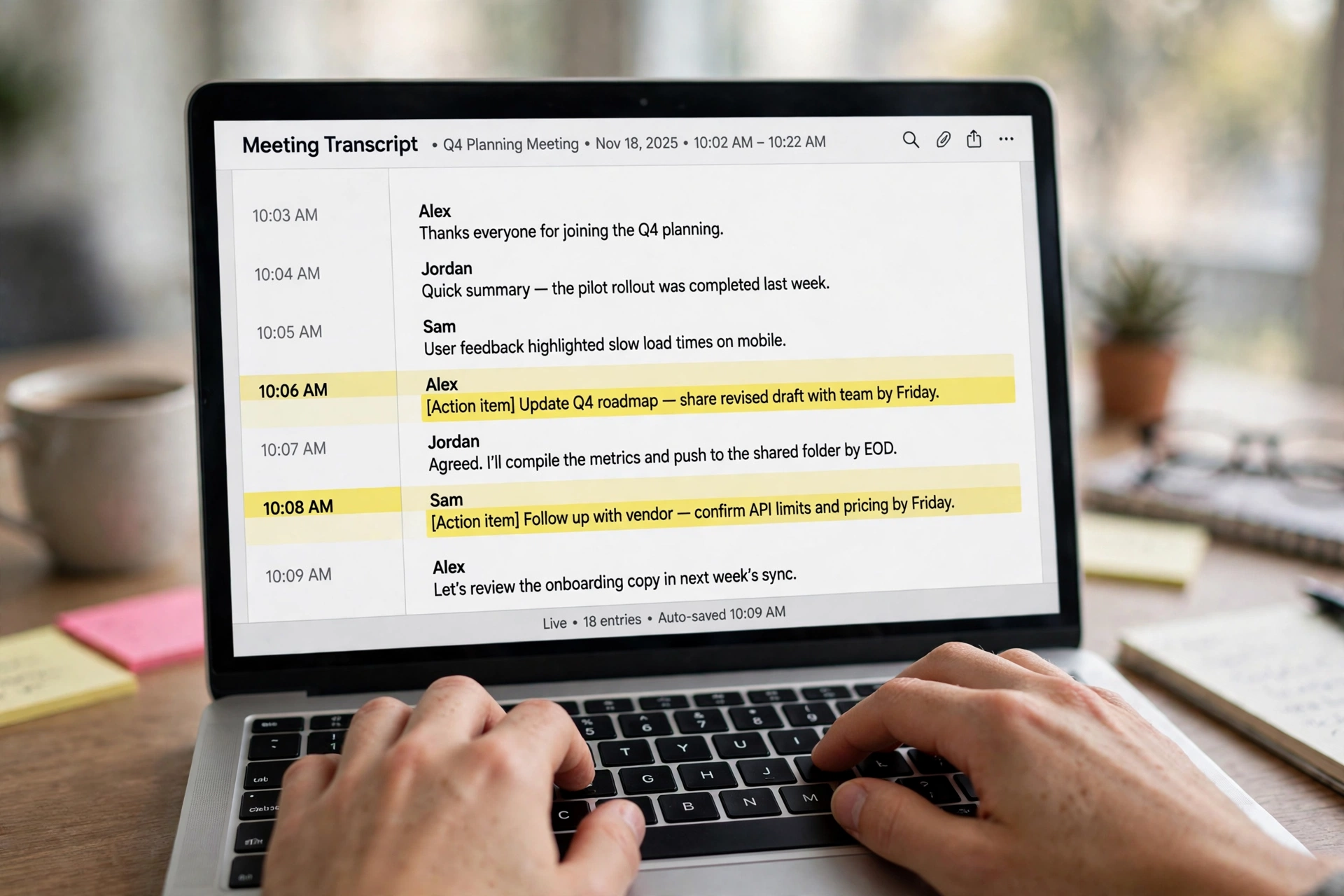
How do AI meeting notes actually work?
Four steps run one after another. First comes capture. The tool either joins the call as a visible participant — a bot with a name like “Fireflies Notetaker” — or it records the audio from your own computer. Bot-free tools such as Granola take the second route.
Second comes transcription. A speech-to-text model converts the audio into a written transcript, line by line, with a timestamp on each part and a name attached to each speaker. If the transcript is wrong, everything built on top of it will be wrong too.
Third, a large language model reads the full transcript and works out what mattered. It is not hunting for keywords. It reads the conversation as a whole, spots the topics, and pulls out the promises people made.
Fourth, the tool formats the result: a short overview, the key points grouped by topic, a list of decisions, and action items with owners. Some tools push those action items straight into a project board or a CRM. Natural language processing does the heavy lifting in steps two and three, and the AI pillar guide explains the language models behind it. The Fireflies guide to automated meeting notes walks through the same layers with a worked example of the output.
What do you get after the meeting ends?
The package is usually the same shape: a full transcript you can search, a summary of a few paragraphs, a decisions list, and action items. The better tools also flag open questions and let you ask the notes questions afterwards, like “What did we agree about the launch date?” AI agents are pushing this further, with assistants that can answer questions about a meeting while it is still happening.
Here is what a decent set of notes looks like for a thirty-minute product call: a one-paragraph overview, three or four bullet points per topic, two decisions, and four action items, each with a name and a date. If your tool hands you five generic bullets that could describe any meeting, it is not doing the job. Mural’s guide to AI notetakers lists the same outputs — transcript, summary, action items, speaker attribution — as the standard set to expect.
Which tool fits which kind of team?
The best-known names cover different ground, and the right pick depends on how your team meets.
| Tool | Best for | Standout trait |
|---|---|---|
| Otter.ai | Individuals and small teams | Live transcription you can watch and search as the call runs |
| Fireflies.ai | Busy teams and sales calls | Deep integrations that push notes and action items into CRMs |
| Fathom | Solo users and small teams | Generous free plan with unlimited recordings for one user |
| Granola | People who dislike meeting bots | Bot-free capture from your own computer, including in-person meetings |
Most of these offer a free tier, so the honest way to choose is to run the same meeting through two of them for a week and compare the action items. Whichever one catches the promises people actually made is the one to keep.
Where do AI meeting notes go wrong?

They go wrong in a few predictable ways. Cross-talk is the first: when two people speak at once, the transcript can assign words to the wrong person, and a misattributed promise is worse than no promise at all. Quiet rooms and one speaker at a time help more than any setting in the tool.
The second is hallucinated detail. A language model can invent a decision that was never made. When a summary looks surprising, check it against the transcript before you forward it.
The third is the opposite problem — notes so vague they say nothing. “The team discussed the project and agreed on next steps” is not a note, it is a shrug. If your tool keeps producing that, try a different summary template. Specific prompts help here, and the prompt engineering guide covers how to ask a model for structured output.
How to set one up without annoying your team
Start with consent. Tell everyone before the first recorded meeting, put it in the invite, and let people object. Recording people without telling them is a fast way to lose trust, and in some places it breaks the law, so check your local rules first.
Then check where the data goes. Recordings and transcripts live on the vendor’s servers: how long are they kept, who can see them, and can they be deleted? If your meetings cover customers or anything sensitive, pick a tool whose privacy page answers those questions plainly.
Finally, give it a trial run with one recurring meeting. One team, one month, and a short review at the end: did the action items get done faster, and did anyone actually read the summaries?
Frequently Asked Questions
Do AI meeting notes tools work on Zoom, Teams, and Google Meet?
Yes, the main tools support all three. Most join as a bot participant, while some capture audio from your computer instead.
Are AI meeting notes accurate?
Usually, for clear audio with one speaker at a time. Accuracy drops with cross-talk and background noise. Always check action items against the transcript before sharing them.
Can AI meeting notes replace a human note-taker?
For routine meetings, mostly yes. For sensitive meetings, a human still adds judgment about what mattered and what was left unsaid.
Is it legal to record meetings with AI?
It depends on where you and the other participants are. Many places require everyone to consent. Tell people in advance and check local rules before you record.
What happens to my meeting recordings?
They are stored by the tool’s vendor, usually with a retention setting you can change. Check how long recordings are kept and who can access them.
The bottom line
AI meeting notes turn a call into a record, a to-do list, and a searchable memory of what was decided — all without anyone typing during the meeting. The technology is straightforward: capture, transcribe, summarise, and assign. The part that takes judgment is yours: checking the action items, telling people you are recording, and deciding which meetings are worth keeping notes of at all.
If you run meetings every day, try one tool on a single recurring meeting for two weeks. Compare its action items with what people actually promised, and keep it only if the notes save more time than they take to check.