
A laptop battery works by storing energy in chemical form and releasing it as electricity when you unplug your laptop. Inside, charged particles move between two electrodes, pushing electrons through the laptop’s circuits. Plug in the charger and the process runs in reverse, restoring the battery for next time.
Key Takeaways
- Most modern laptop batteries are lithium-ion batteries: several cells plus a small management circuit.
- Charging moves lithium ions one way; using the laptop moves them the other way.
- Heat, deep discharges, and age all wear a battery down, even with careful use.
- Screen brightness, heavy programs, and wireless connections are among the biggest drains on one charge.
- Sensible brightness, good ventilation, and avoiding long spells at 0% help more than fiddly charging rituals.
What is inside a laptop battery?
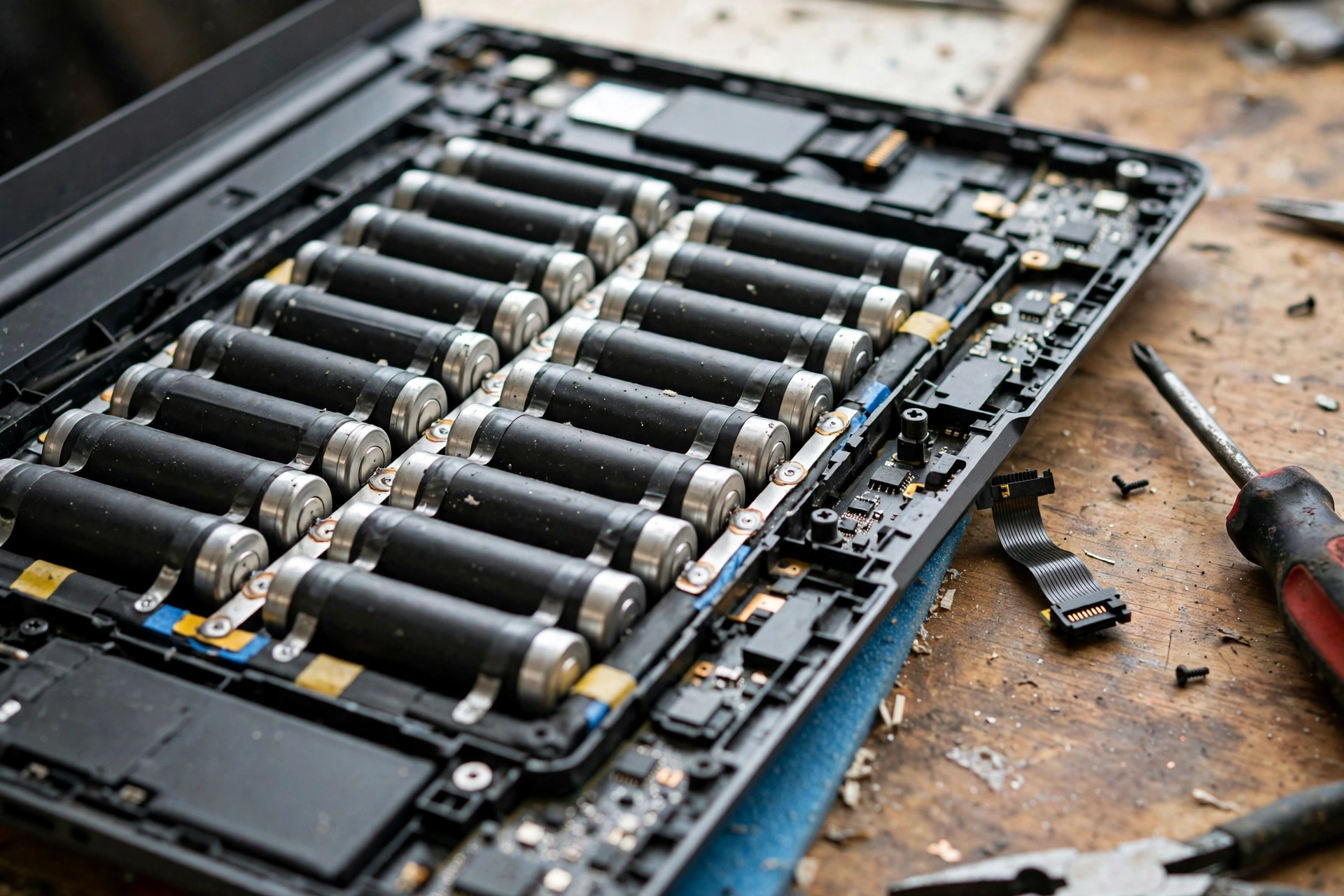
Inside a laptop battery you will usually find a set of cells wired together, a circuit board, and a connector to the laptop. Older laptops often used cylindrical cells; many newer, thinner laptops use flat pouch cells shaped to fit the space. Either way, the job is the same: hold enough charge to run the laptop away from a socket, without adding too much weight.
Each cell has a positive electrode, a negative electrode, and a separator between them, all soaked in an electrolyte. The management circuit watches voltage, temperature, and current. It stops charging when the battery is full, cuts power if something looks unsafe, and reports the percentage you see on screen. That percentage is an estimate, not a precise fuel gauge, which is one reason it can jump or stall near the end of a charge.
How does a battery power a laptop?
When you use your laptop on battery power, chemical reactions inside the cells release electrons. They travel out through the battery’s terminals, around the laptop’s circuits, and back again, powering the processor, screen, memory, and storage. At the same time, lithium ions move inside the cells through the electrolyte, keeping the reaction balanced.
Think of it like water flowing downhill. Charging pumps the water back uphill; discharging lets it flow down to turn a wheel. Nothing is created from nothing: the battery simply stores energy you put in earlier, then hands it back in a controlled form.
That is also why a laptop may dim or slow down on a low battery: it lowers brightness and pauses background tasks to stretch what is left.
What do watt-hours mean?
Battery size is often given in watt-hours (Wh), a measure of energy. A 50 Wh battery can, in theory, deliver 50 watts for one hour, or 25 watts for two hours. Bigger numbers usually mean longer run time, but a bright screen and a demanding program will drain power faster than light browsing, so two laptops with the same battery size can still last very different times.
Why does charging slow down near the end?
Charging usually happens in two stages. First, the charger pushes a steady current into the battery until it reaches a set voltage. Then it holds that voltage while the current gradually falls, topping the battery up gently.
That gentle finish protects the cells. Pushing hard right up to 100% would stress them and shorten their life, so the management circuit eases off. The same caution applies in reverse: your laptop usually shuts down before the battery is truly empty, leaving a small reserve to protect the cells from deep discharge.
Why do laptop batteries wear out?
Every charge and discharge cycle wears a battery a little. A cycle need not happen in one go: using half the charge, recharging, and using half again counts roughly as one cycle. Over hundreds of cycles, the electrodes and electrolyte change in small ways, and the battery holds less charge than when new. That is normal ageing, not necessarily a fault.
Heat speeds it up. A laptop left in a hot car or used on a soft bed that blocks its vents will age its battery faster than one kept cool and ventilated. Staying at very high or very low charge for long periods adds stress too, which is why some laptops offer a charge limit, such as stopping at 80%, for desk use. Age matters on its own as well: an unused battery still loses capacity slowly.
How can you make a laptop battery last longer?
Start with the biggest drains. Lowering screen brightness a notch or two often makes a bigger difference than closing a handful of background apps, because the display is usually the hungriest part. Battery-saver mode, which dims the screen and slows background work, helps on long days without a socket.
Wireless connections also use power, though less than the screen. Working offline with Wi-Fi and Bluetooth off can help a little — our guides explain how Wi-Fi works and how Bluetooth works. Unplug accessories you are not using: a separate speaker, covered in our guide to how a computer speaker works, draws power while it plays. Our guide to how wireless charging works also explains why a good cable and a steady connection matter for efficient charging.

For long-term health, keep the laptop cool and ventilated, avoid running it down to zero every day, and do not leave it fully drained for weeks. If you mostly use it at a desk, check whether it has a battery-health or charge-limit setting, and follow the maker’s guidance for your model.
When should you replace a laptop battery?
Consider a replacement when the laptop no longer lasts your normal day, shuts down suddenly at a middling percentage, or swells. Swelling is the clearest warning: if the trackpad feels raised or the case does not sit flat, stop using the laptop and get it checked by the maker or a qualified repairer. Do not puncture, bend, or try to open a swollen battery yourself.
Otherwise, check the battery health report in your operating system: it shows designed capacity against current full-charge capacity. If the current figure is well below the designed figure, a replacement battery — fitted by the maker or a reputable repairer, especially on sealed models — is usually a better fix than a new laptop. Recycle the old battery through a battery recycling scheme, not household waste.
FAQs
Is it bad to leave a laptop plugged in all the time?
Not as bad as it once was. Modern laptops stop charging at full and run from the mains, so they are not constantly overcharging. Still, heat and sitting at 100% for months can add wear, so a charge limit for desk use, if your laptop offers one, is a sensible step.
Should I drain my laptop battery to 0% before charging?
No. That advice comes from older battery types. Lithium-ion batteries prefer shallow, regular top-ups to repeated deep discharges. Running flat occasionally will not ruin it, but doing it daily will wear it faster.
Why does my battery percentage jump or drop suddenly?
The percentage is an estimate based on voltage, current, and past use. Heavy work, cold weather, or a sudden brightness change can shift it, and an ageing battery’s voltage can fall faster near the end of a charge. A one-off jump is usually the estimate catching up.
Does fast charging damage a laptop battery?
Fast charging creates more heat, and heat ages batteries, so it can add a little wear over time. But it is designed for the laptop, with the management circuit controlling current and temperature. Using the maker’s recommended charger and keeping the laptop ventilated keeps the risk low.
Can a laptop battery be replaced?
Often, yes, though it depends on the model. Some laptops have a removable battery you can swap yourself. Many newer models have sealed batteries that need tools and care, so a maker service or qualified repairer is safer. Check your model’s manual before ordering a part.
Conclusion
A laptop battery is a quiet compromise: a pack of chemical cells, a watchful circuit, and a charger that fills it gently at the end. It stores energy, hands it back as electricity, and slowly wears out as its chemistry ages — faster in heat, slower with sensible care.
Your practical next step is simple: check your battery health report, lower your screen brightness one notch, and make sure the laptop can breathe while it works and charges. Those three checks tell you whether your battery is ageing normally or ready for a replacement, and they cost nothing. For deeper background, the Wikipedia overview of lithium-ion batteries and Britannica’s guide to batteries explain the chemistry in more detail.