
AI help with coding means a tool suggests lines of code as you type, explains code you did not write, spots likely bugs, and drafts tests for you. It works best as a fast assistant, not a replacement for a developer — you still need to read what it writes, run it, and decide whether it fits your project.
Key Takeaways
- AI coding tools suggest completions and boilerplate as you type, cutting repetitive typing.
- They explain unfamiliar code in plain language and flag likely bugs before you run anything.
- AI can draft tests and suggest fixes, but its output must always be reviewed and tested.
- Generated code can hold errors, outdated patterns, or security flaws — human judgement stays essential.
- Clear instructions, small tasks, and checking every suggestion give the best results.
How does AI suggest code as you type?
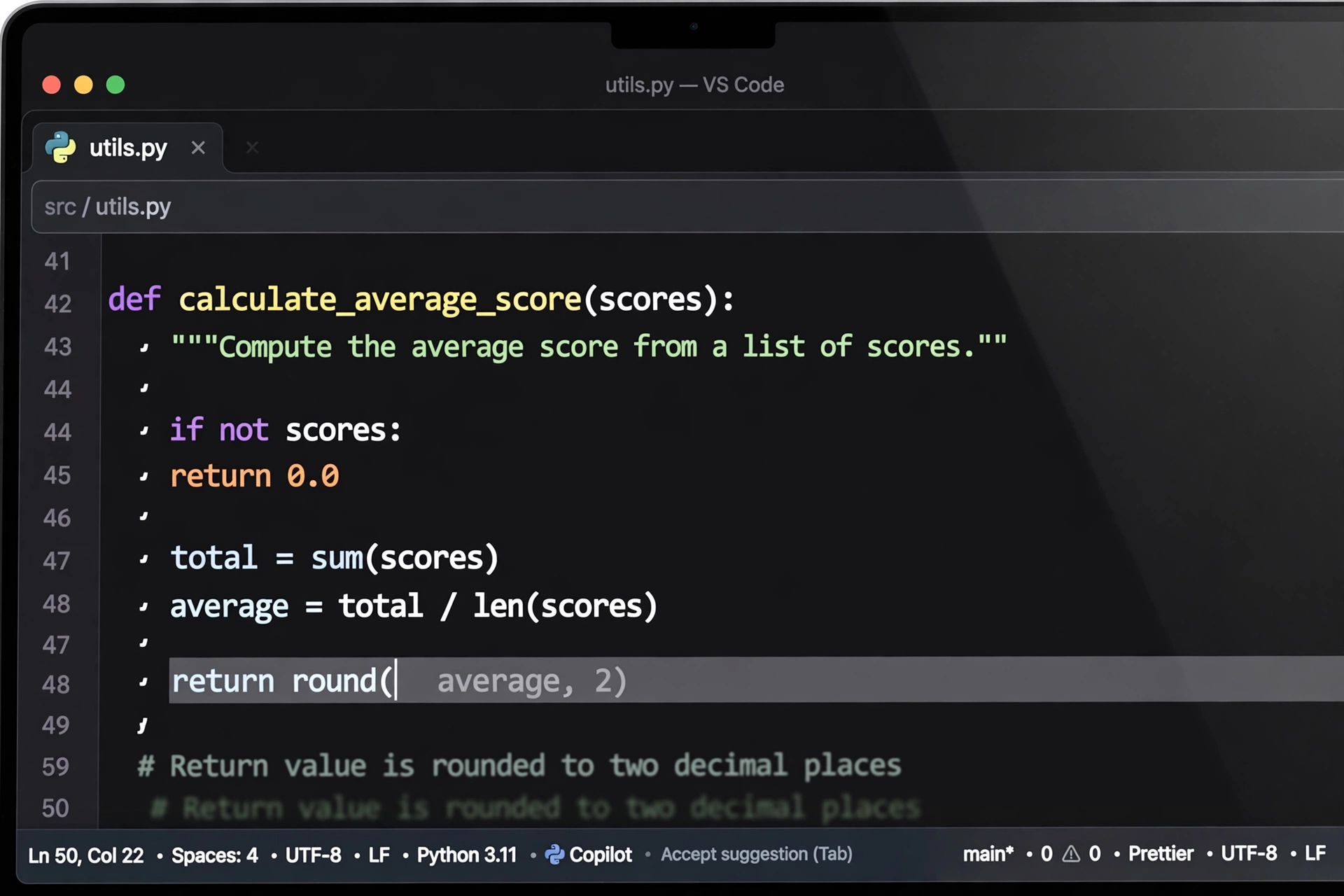
The most common way AI helps with coding is autocomplete on a grand scale. As you type in your editor, the tool predicts what should come next — sometimes a single line, sometimes a whole function — based on the code around it.
This shines with repetitive work. Writing a form handler, a database query, or a loop you have written a dozen times is exactly where suggestions save time. You type a comment like “sort users by signup date”, and the tool offers a plausible version. You accept it, tweak it, and move on.
The suggestions come from models trained on huge amounts of public code, which is why they feel so fluent. But fluency is not correctness, so read every suggestion before you accept it.
Can AI explain code you did not write?
Yes, and this is where many developers find AI genuinely useful. Paste in a chunk of code you inherited, or highlight a function in your editor, and ask what it does. The tool will walk through it in plain language and flag anything odd.
This helps when you join a project and must understand an undocumented module, or return to your own code after six months. An explanation gets you oriented in minutes.
The explanation is a starting point, not a guarantee. AI can misread tricky code or describe what it seems to do rather than what it actually does. Use it to guide your reading, then check the code yourself.
How does AI help find and fix bugs?
AI tools can look at an error message and a chunk of code and suggest what went wrong. Sometimes the fix is obvious — a missing bracket, a variable used before it was set. Sometimes the tool spots a subtler problem, like a loop that never ends.
Describe the error, paste the code, and the tool proposes a fix. You apply it, run your tests, and see whether the error goes away.
AI cannot understand your whole project the way you do. A fix that passes the tests can still be the wrong fix for the product. That judgement is yours.

Can AI write tests for your code?
AI can draft tests quickly, and this is one of its most practical uses. Give it a function and ask for tests, and it will usually produce cases for the normal path, the edge cases, and a few invalid inputs. For a simple function, that can be most of the test file in seconds.
The catch: AI-written tests can share the same blind spots as AI-written code. If the tool misunderstands the function, it may test the wrong behaviour — and a passing test for the wrong behaviour is worse than no test. Treat AI tests as a first draft: read each case and add the ones the tool missed.
What are the limits of AI coding help?
First, AI does not truly understand your code. It predicts likely text, so it can invent functions that do not exist or mix up two similar APIs. These invented details look confident, so they are easy to miss.
Second, AI has a cut-off in what it knows. A model trained last year may not know about a library released this year, and it may suggest an older way of doing something that has since been replaced.
Third, security is a real concern. Generated code can include unsafe patterns, like building a database query from raw user input, so code touching user input, passwords, or payments deserves extra care.
Finally, AI struggles with large, connected systems. It can write a neat function, but it is much weaker at designing how dozens of files should fit together. Architecture is still a human job.
How do you use AI coding tools well?
Start with clear instructions. A vague prompt gets a vague answer. Say what the code should do, what inputs it takes, and what it should return. This is where a little prompt engineering pays off — the same skill that helps with chatbots helps here too.
Keep tasks small. Ask for one function at a time rather than a whole feature. Small pieces are easier to read, test, and fix, and the tool’s suggestions are more likely to be right.
Always run the code. Never trust a suggestion you have not executed. Run it, check the output, and run your tests. If there are no tests, write at least one before you move on.
Review security-sensitive code twice: anything handling logins, payments, or personal data should be read line by line. And keep learning the basics — developers who understand code spot bad suggestions fastest.
Frequently Asked Questions
Is AI-generated code safe to use?
It can be, but only after review. AI-generated code may contain bugs, outdated patterns, or security flaws, so read it, run it, and test it before it reaches users. Treat it like code from an unknown contributor.
Do I still need to learn to code if AI can write it?
Yes. You need to understand code to check it, fix it, and judge whether it does what you want. Developers who understand the basics get far more from these tools than those who accept every suggestion blindly.
Which AI coding tools are popular?
GitHub Copilot is the best known, built into editors like VS Code. Other options include AI features in JetBrains IDEs, Cursor, and general chatbots. Most work the same way: they read your code and suggest what comes next.
Can AI write a whole app on its own?
It can produce a rough version of a small app, but not a finished product. Real apps need design decisions, testing, security checks, and fixes for the edge cases AI misses. AI is best for the pieces, not the whole.
Does AI coding help work for every programming language?
It works best for popular languages with lots of public code, like Python, JavaScript, and Java, because the models have seen more examples. For rare or very new languages, suggestions are thinner and less reliable.
Conclusion
AI help with coding is at its best when you treat it as a quick, tireless junior developer: great at boilerplate, explanations, and first drafts, but in need of supervision. Its limits — invented details, stale knowledge, security gaps — are manageable as long as you review, test, and think for yourself.
Try it on one small, low-risk task this week: pick a repetitive function, let the tool draft it, and review every line before you commit. You will quickly learn where it helps and where you still need to do the thinking.